The 0-360 Panoramic Optic™
|
● Arguably, the widest angle 'lens' ever produced!
● 360 degree photos with just ONE SHOT. No stitching!
● 115 degree Vertical Field of View - 360 degree Horizontal Field of View
● Software for both still panoramic virtual tours and 360 degree video
● All glass optics and aluminum hardware
● Final production run!
● links:
|
The above tour was created with Tourweaver Standard.
Tourweaver software, now 10% off with purchase of 0-360 Panoramic Optic!
(Logo, map, icons, hotspots are user-settable options)
|
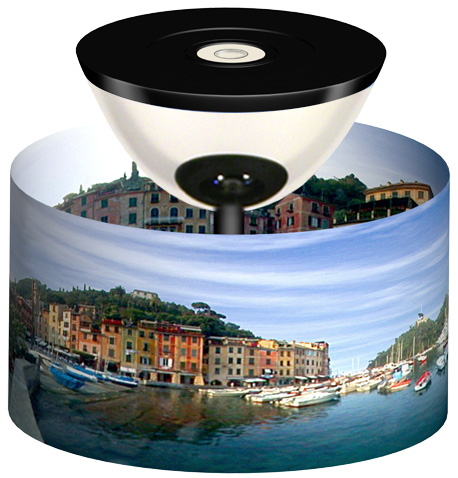
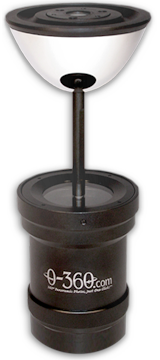
The 0-360 Panoramic Optic™ has been produced and sold since 2002. The 0-360 is a specially designed 360-degree panorama lens attachment, with an exclusive optical reflector which captured an entire 360 degree panoramic virtual tour with a single shot (no stitching of multiple photos). Its proprietary shape was derived through extensive research, and is mathematically unique. The 0-360 Panoramic Optic has been sold worldwide to professional photographers, real estate agents, Homeland Security, first responders, the US military, NASA, universities, robotics labs, and many others. This product has been a groundbreaker, making the creation of 360 degree virtual tours easy enough for the non-professional, by eliminating the stitching process. This allows a virtual tour to be captured, processed, and uploaded to the internet in less than 60 seconds. This method produces images which are naturally free of stitching errors, and is still in use by many around the globe.
360 degree video!
This 360 degree video was taken using the 0-360 Panoramic Optic™
With the 0-360 Panoramic Optic and a Canon T3i digital SLR camera, all 360 degrees were captured in video seamlessly. Our 360video Unwrapper Studio software displays the 360 degree video in virtual tour format, Real-time streaming 360 degree video is also an option using our software.